
WhatsApp order assistant
It takes orders even when your shop is closed
Your customer writes on WhatsApp. The assistant answers like a shop assistant who knows your products, takes the order, and tracks payment and shipping. You see everything from your phone.
- We do the setup
- Your own WhatsApp line
- Asks you what it doesn't know
- Hello, do you have the black satin dress in size M?
- Hello! Yes, the Satin Midi Dress is in stock in size M. Would you like me to set it aside?
- Yes, can you send it to Kadıköy? I will pay by bank transfer.
- Of course. Your order is received ✅ I am sending the transfer details; once you pay, just write “sent”.
Sample conversation; the business and people are fictional.
Orders often come when you are not at the counter
A message at night waits until morning
The shop has closed, the message waits until morning. Meanwhile the customer has bought elsewhere.
The same question, dozens of times a day
Price, size, shipping time, cash on delivery... A few minutes each, an afternoon in total.
“Did the transfer arrive, did the cargo go out?”
Order in a notebook, payment in a bank app, cargo number on paper: tracking is a job in itself.
Whichever channel they write from, the order joins the same queue
Your customer writes on WhatsApp or in the chat window on your website. The same assistant answers; orders, payments and shipping come together in your panel.
The customer writes
- WhatsAppTalks from your own business number.
- Chat on your websiteA chat window on your website, in your colours.
The assistant takes the order
Order assistantKnows your catalogue and asks you what it doesn't know.It lands in your panel
- Order
- Stock check
- Shipping fee
- Payment link
- Tracking number
- Return request
Examples from systems we built
Sample data is used in the screenshots.
Order assistant panel
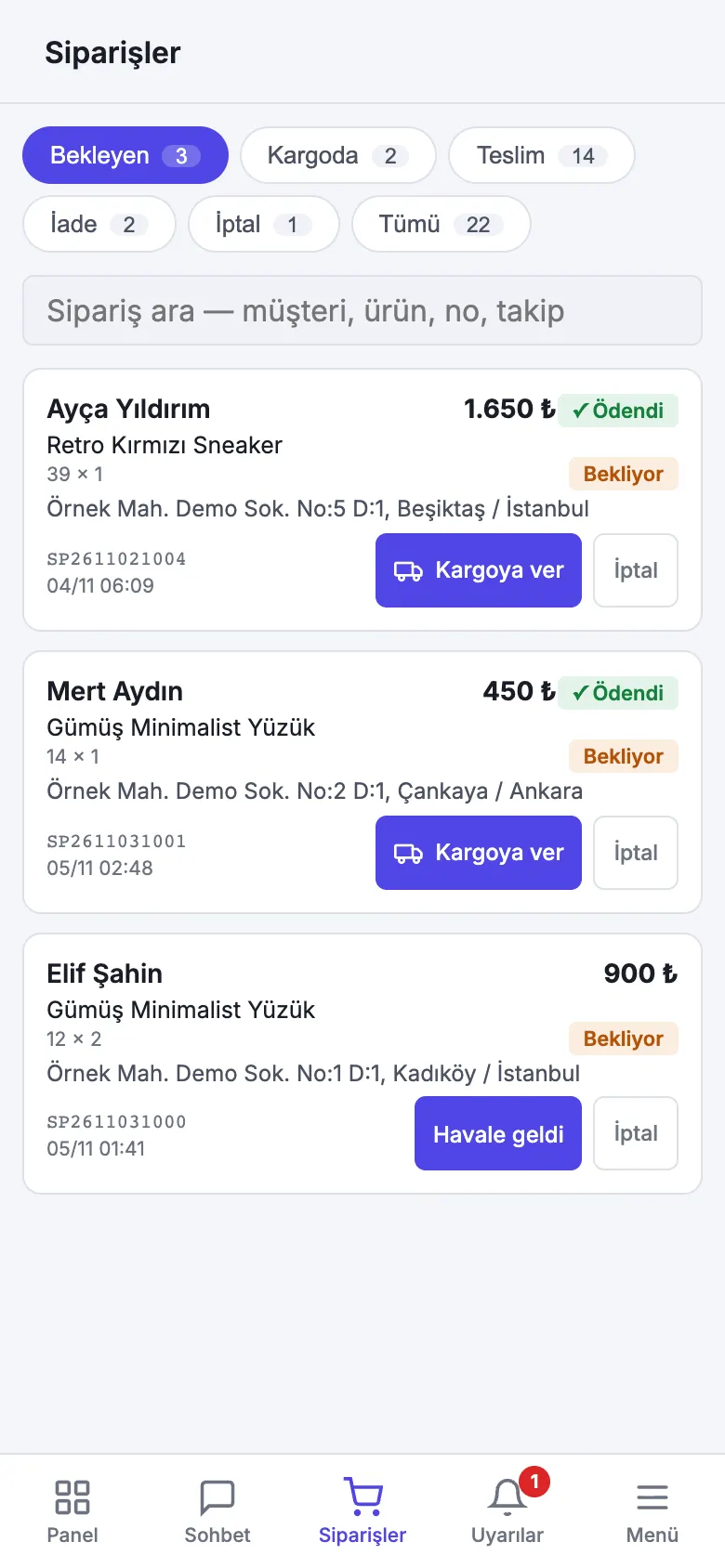
The interface shown is in Turkish; values are illustrative.
Tour the panel yourself
A short tour of the demo panel with sample data: each step shows a screen and what it is for. No sign-in, works on your phone too.
The demo panel runs on sample data; your changes are not saved.
Try it yourself
The assistant of a sample boutique is running right now. Write a question, place an order, and see how it lands on the business's screen.
How to try it?
This is a sample shop; no order or payment is actually made. Do not write personal information: others trying the demo can also see what you write.
Live · working right now
Tap a question or write your own
Tour the business panel right here, step by step
An order placed in the chat lands in the business's panel. You can tour that panel here, step by step: each step shows a screen, and you can click around yourself.
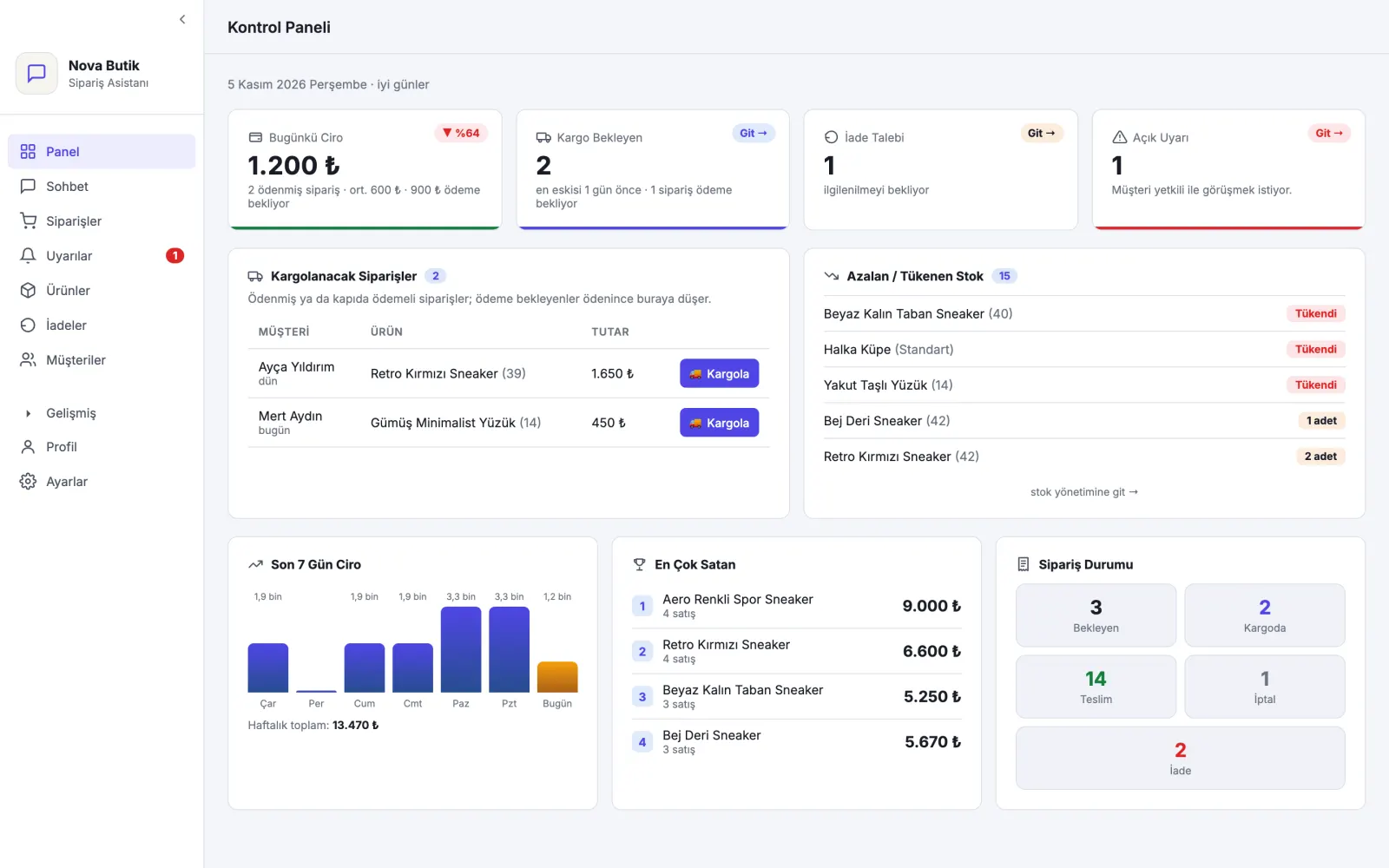
The demo panel runs on sample data; your changes are not saved.
The demo panel runs on sample data; your changes are not saved.
No time to type? Look at a short example with ready-made answers
- Assistant: Hello, welcome to Sample Bakery! How can I help you?
- Product
- bekleniyor
- Size
- bekleniyor
- Delivery
- bekleniyor
This is a sample demo; the businesses and conversations are not real.
It never makes things up
It asks you what it doesn't know and learns your answer
If the assistant doesn't know an answer, it doesn't guess. It asks you and the staff you choose on WhatsApp; the first answer is politely passed on to the customer.
When the next customer asks the same thing, it already knows the answer. If it learned something wrong, you delete it from the panel.
- CustomerIs there a fitting room in the store?
- AssistantI am asking our store about this, and I will write here as soon as the answer comes 😊
- To your phone❓ A customer is asking: “Do you have a fitting room?” Reply to this message to write the answer.
- You❓ A customer is asking…yes, two rooms, no appointment needed
- From the assistant to the customerWe asked our store: yes, we have two fitting rooms, no appointment needed. We look forward to seeing you!
Run your shop from your phone
The panel is added to your phone like an app; new orders and alerts arrive as notifications.
Orders from chat
Several products in one order, in one shipment. It calculates the shipping fee itself.
Payment tracking
Transfer details, a secure payment link with iyzico or PayTR, a “transfer received” mark.
Shipping and returns
You enter the tracking number when shipping; you do not write the message to the customer separately. Cancellations and returns from the panel.
Voice and photos
It understands voice messages; it finds the product in the customer's photo in your catalog.
“I wouldn't say it like that”
Write the right version of an answer you don't like; from then on the assistant answers that way.
Team and roles
Your employee enters the panel with their own phone; only you see turnover and settings.
Campaign
Prepare the message template in the panel and send it for approval, and choose customers by tag. It doesn't go to anyone who said “I don't want it”.
Ticimax connection
Products and stock come from your site; the WhatsApp order is passed to your site.
Website chat
The same assistant also works in the chat box on your site.
For businesses taking orders on WhatsApp
- Boutique
- Bakery
- Dessert shop
- Delicatessen
- Nut and dried-fruit shop
- Social media seller
- Regional products
- Coffee shop
- Florist
A shop that uses it: Uludağoğulları Helvacısı, a halva shop in Çanakkale, takes its WhatsApp orders with this assistant.
We do the setup
You tell us about your shop; we load the products, set up the assistant and connect it to your line.
Meeting
We listen to your products, prices, shipping and payment routine.
Setup
We load your catalogue, set the assistant to speak in your shop's voice and connect it to your WhatsApp business line.
Go live
The assistant starts answering your customers; you follow the panel from your phone.
- Ticimax, iyzico and PayTR connections are ready.
- You decide what the assistant says and what it doesn't.
- Each business's data is kept separate; one shop cannot see another shop's customers.
Frequently asked questions
Is my own WhatsApp number used?
Yes. The assistant speaks from your business line; the customer sees your name and logo. We look together during the setup meeting at which number is suitable.
What if the assistant says something wrong?
It states price, stock and shipping information only from the list you gave. It asks you what it doesn't know. You fix an answer you don't like with “I wouldn't say it like that”, and delete a wrong piece of information it learned from the panel. You can take over the conversation at any moment.
Who does the setup, and how long does it take?
We do it: we load your products, prices, and your shipping and payment rules, and set the assistant to speak in your shop's own language. The time depends on Meta's approval of your WhatsApp line.
Where is my data kept?
On a server in Europe (Frankfurt). Each business's data is separate at the database level; one shop cannot see another shop's customers.
I have an e-commerce site, can it be connected?
The Ticimax connection is ready: products and stock come from your site, and the WhatsApp order is passed to your site. For other platforms, talk to us.
See it with your own products
In a short meeting we set up a trial that works with your shop's products; you talk to the assistant from your own phone.